

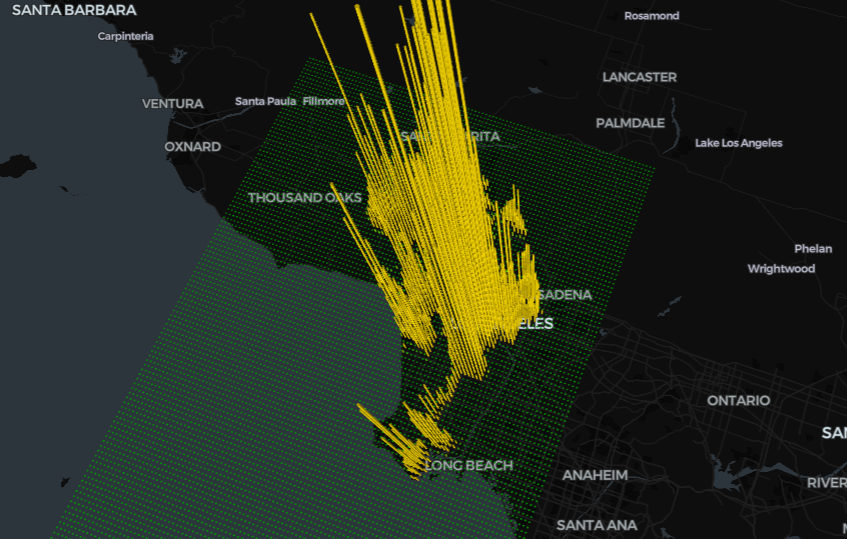


In my opinion, one of the best features geo data possesses is its capability for 3D visualization. However, due to the amount of computational resources needed for such calculations, it’s really rarely performed in python (often JavaScript and its libraries used as alternatives). In one of my previous articles I shared six python packages which allow creation of beautiful static and interactive maps, yet only in 2D space.
Today I want to bridge this gap and investigate with you a really stylish and efficient framework for high-performance web-based visualizations deck.jl, which also has a python library PyDeck.
To properly explore its capabilities in python we need a large geospatial dataset. A perfect candidate for that is Los Angeles Crime Data 2010–2020 dataset from Kaggle. Luckily, it has an open license, so we could freely use it for our purposes.
The authors distribute two csv files, which we are going to merge into one filtering out all the columns except longitude and latitude (coordinates of the places where the crimes were conducted).
🐍The full python code: GitHub.
import numpy as np
import pandas as pd
import xarray as xr
import geopandas as gpd
import random
import mathimport matplotlib.pyplot as plt
from shapely import Point
import cartopy
import cartopy.crs as ccrs
import cartopy.feature as cfeature
import warnings
warnings.filterwarnings('ignore')
recent = pd.read_csv('./LA Crimes/Crime_Data_from_2020_to_Present.csv')[['LAT', 'LON']]
old = pd.read_csv('./LA Crimes/Crime_Data_from_2010_to_2019.csv')[['LAT', 'LON']]
df = pd.concat([old, recent])
df = df[(df.LON!=0) & (df.LAT!=0)] #zeros are Nans according to meta info
After loading it in pandas, I want to perform a static 2D visualization using cartopy, just to have a reliable reference. If we simply plot the data, we’ll get a bunch of data points, which are of no use for us.

Instead let’s perform spatial interpolation using the NN method (you can read more about it in my other article).
Basically, it means that we transfer sparse observations into a geographical grid (PyDeck will do the same thing, in this case it can be called data aggregation).
def coords(x,y, base=0.01):
x, y = round(base * math.ceil(abs(x)/base),2), round(base * math.ceil(y/base),2)
return (y,x)def NN(data, LAT, LON):
array = np.zeros((LAT.shape[0], LON.shape[0]),dtype=int)
onGrid = data.apply(lambda row: coords(row.LAT, row.LON, 0.01), axis = 1).value_counts()
for coor in onGrid.index:
lon_idx, lat_idx = np.where(LON==coor[0]), np.where(LAT==coor[1])
array[lat_idx,lon_idx] = int(onGrid[coor])
return array
After the algorithm is done (you’ll need to wait for some time, since we have more than 2 mil rows to process), we can wrap its results into an xarray dataset and map it.
LAT, LON = np.arange(round(df.LAT.min()), round(df.LAT.max()), 0.01).astype(np.float32), np.arange(round(df.LON.min()), round(df.LON.max()), 0.01).astype(np.float32)
crimes = NN(df, LAT, LON)
ds = xr.Dataset(
{'Crimes': (['lat', 'lon'], crimes)},
coords={'lat': LAT, 'lon': LON})fig, ax = plt.subplots(subplot_kw=dict(projection=ccrs.PlateCarree()), figsize=(16, 9))
ds.Crimes.plot(ax=ax, cmap='Reds')
ax.set_extent([-118.9, -118.1, 33.6, 34.5 ], crs=ccrs.PlateCarree())
ax.gridlines(draw_labels=True,linewidth=2, color='black', alpha=0.5, linestyle='--')
ax.add_feature(cfeature.BORDERS, edgecolor='black', linewidth=1)
ax.add_feature(cfeature.COASTLINE, edgecolor='black', linewidth=1)
ax.add_feature(cartopy.feature.RIVERS, edgecolor='blue', linewidth=0.5)
states_provinces = cfeature.NaturalEarthFeature(
category='cultural', name='admin_1_states_provinces',
scale='10m', facecolor='none')
plt.show()

From my perspective, it looks nice and informative, but if you need to sell this project to someone, you’ll most probably fail with such a map xD. So let’s pip install PyDeck and see what it can do for us!
The first type of map layer I found beautiful was the Hexagon layer. You need to specify it while creating the Layer variable in PyDeck. There are several other crucial parameters for us:
- radius (the radius of hexagon in meters, i.e. spatial resolution in m);
- elevation_scale (scale factor for bins, the greater the value, the higher the hexagons);
- elevation_range (min and max height);
- pickable (interactively showing the values);
- extruded (cell elevation).
layer = pdk.Layer(
'HexagonLayer',
df,
get_position=['LON', 'LAT'],
radius=500, #bin radius
auto_highlight=True,
elevation_scale=50, #scale factor for bins (the greater - the higher)
elevation_range=[0, 3000],
pickable=True,
extruded=True,#cell elevation
)
The second variable we need to create is the View state. We need to feed it with:
- longitude and latitude;
- zoom (initial zoom);
- min_zoom and max_zoom;
- bearing (left/right view angle);
- pitch (up/down view angle).
view_state = pdk.ViewState(
longitude=-118.3,
latitude=34.4,
zoom=8,
min_zoom=6,
max_zoom=15,
bearing=-20,#left/right angle
pitch=20, #up/down angle
)
Since we have a large dataset, google colab doesn’t display all the dataset, so you have two options:
- Sample N rows from the dataset;
- Save the map to html and open it in your browser.
If you pick the second one, you’ll get this:

To be honest, I love how hexagons look, but I’ve never seen them in any scientific paper/presentation/lecture, so I’d recommend using them consciously.
Now let’s try to create a similar visualization, but using columns. But in this case we will need to pass to the function the xarray dataset we created earlier and specify the color and the variable to visualize:
layer = pdk.Layer(
'ColumnLayer',
ds.to_dataframe().reset_index(),
get_position=['lon', 'lat'],
get_elevation='Crimes',
elevation_scale=10,
radius=200,
get_fill_color=['Crimes', 220],
pickable=True,
extruded=True,
)

In essence, scatter plot is a cloud of points, but the authors of PyDeck developed cylinders, which look quite unique:

layer = pdk.Layer(
'ColumnLayer',
df[:15000],
get_position=['LON', 'LAT'],
auto_highlight=True,
get_radius=200,          # Radius is given in meters
get_fill_color=[180, 0, 200, 140],  # Set an RGBA value for fill
pickable=True)

A really cool thing about PyDeck is that as plotly, geemap, folium and other interactive mapping tools, it allows users to change the basemap, meaning you can design a map according to your project’s context:
r = pdk.Deck(layers=[layer],
initial_view_state=view_state,
map_style=pdk.map_styles.LIGHT, # ‘light’, ‘dark’, ‘road’, ‘satellite’, ‘dark_no_labels’, and ‘light_no_labels
)

The next feature, which I find super helpful, is changing the interactive data description. By putting a cursor on a column/hexagon/point you can get meta information, but often it looks a little bit preposterous. But in PyDeck you can easily overcome it:
r = pdk.Deck(layers=[layer],
initial_view_state=view_state,
"html": "<b>Number of crimes:</b> {elevationValue}",
"style": {
"backgroundColor": "yellow",
"color": "black"
}
},
)

Finally, the most amazing feature of this library is your ability to change the viewing angle on the map simply by clicking the right button of your mouse:
from ipywidgets import HTMLtext = HTML(value='Move the viewpoint')
def filter_by_bbox(row, west_lng, east_lng, north_lat, south_lat):
return west_lng < row['lng'] < east_lng and south_lat < row['lat'] < north_lat
def filter_by_viewport(widget_instance, payload):
west_lng, north_lat = payload['data']['nw']
east_lng, south_lat = payload['data']['se']
filtered_df = df[df.apply(lambda row: filter_by_bbox(row, west_lng, east_lng, north_lat, south_lat), axis=1)]
r.deck_widget.on_click(filter_by_viewport)

I definitely enjoy PyDeck and plan to dive deeper into the deck.jl framework. With super easy and intuitive syntax it allows users to build impressive visualizations being energy-efficient. Python limits the capabilities of this package a lot, so check out their gallery, it’s mind blowing, especially their experimental GlobalView feature…
Hopefully this article was informative and insightful for you!
===========================================
All my publications on Medium are free and open-access, that’s why I’d really appreciate if you followed me here!
P.s. I’m extremely passionate about (Geo)Data Science, ML/AI and Climate Change. So if you want to work together on some project pls contact me in LinkedIn.
🛰️Follow for more🛰️