

This function simplifies adding insets. Here’s how to use it, including an explanation of the `loc` parameter for positioning:
import matplotlib.pyplot as plt
from mpl_toolkits.axes_grid1.inset_locator import inset_axesfig, ax = plt.subplots(); ax.set_box_aspect(0.5) # main figure and axes
ax.plot([0, 9], [0, 9]) # example plot
# create inset axes & plot on them
inset_ax = inset_axes(ax, width="30%", height=1.2, loc="upper left")
inset_ax.plot([9, 0], [0, 9], color="r")
plt.xticks([]); plt.yticks([]) # strip ticks, which collide w/ main ax
Note that axes size can be specified relative to parent axes or in inches, as shown here with width and height, respectively.

Supported location codes for loc are as follows,
"upper right" | "upper left" | "lower left" | "lower right"
"right" | "center left" | "center right" | "lower center"
"upper center" | "center"
Matplotlib’s Axes class provides the inset_axes member function, which is a straightforward way to create insets relative to the parent axes:
import matplotlib.pyplot as pltfig, ax = plt.subplots(); ax.set_box_aspect(0.5) # main figure and axes
ax.plot([0, 9], [0, 9]) # example plot
# create inset axes & plot on them
ins_ax = ax.inset_axes([.6, .15, .3, .3]) # [x, y, width, height] w.r.t. ax
ins_ax.plot([9, 0], [0, 9], color="r")

Coordinates are specified relative to the parent axes, so — for example — (0, 0, 0.5, 0.2) will create an axes in the lower left-hand corner with width that takes up half of axes width and height that takes up 0.2 of axes height.
To position an inset relative to a parent axes ax in terms of inches, we must first calculate the size of the parent axes in inches.
w_inch, h_inch = ax.figure.get_size_inches() * ax.get_position().size
Then, pass your x, y, w, and h in inches to Axes.inset_axes as follows
ax.inset_axes([x/w_inch, y/h_inch, w/w_inch, h/h_inch])
Matplotlib’s Figure class provides an analogous add_axes member function, which lets you position insets relative to the overall figure.
import matplotlib.pyplot as pltfig, ax = plt.subplots(); ax.set_box_aspect(0.5) # main figure and axes
ax.plot([0, 9], [0, 9]) # example plot
# create inset axes & plot on them
ins_ax = fig.add_axes([.2, .5, .2, .2]) # [x, y, width, height] w.r.t. fig
ins_ax.plot([9, 0], [0, 9], color="r")

Similarly to before, coordinates will be specified relative to the parent axes, so — for example — (0.5, 0.5, 0.3, 0.2) will create an axes 2/10ths the height of the overall figure and 3/10ths the width with the lower left corner centered within the figure.
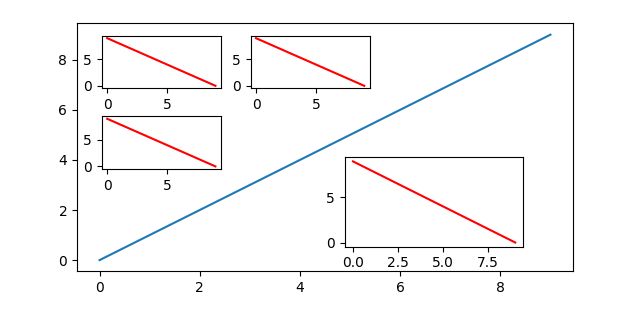
For this next example, we will use the outset library, which provides specialized tools for working with inset axes in matplotlib. It can be installed as python3 -m pip install outset.
The outset library provides the flexible outset.util.layout_corner_insets utility to position multiple inset axes within a specified corner of a main axes. Here’s how to use it to pick positions for calls to Axes.inset_axes.
import matplotlib.pyplot as plt
import outsetfig, ax = plt.subplots(); ax.set_box_aspect(0.5) # main figure and axes
ax.plot([0, 9], [0, 9]) # example plot
# ------ pick inset axes positions: 3 in upper left, one in lower right
inset_positions = outset.util.layout_corner_insets( # upper left positions
3, "NW", # number insets and corner to position in
# optional layout tweaks...
inset_pad_ratio=(.2,.35), inset_grid_size=(.6,.65), inset_margin_size=.05)
inset_positions.append( # generate lower right position & tack on to list
outset.util.layout_corner_insets(1, "SE", inset_grid_size=.4))
# ----- create inset axes & plot on them
inset_axes = [*map(ax.inset_axes, inset_positions)] # create inset axes
for iax in inset_axes: # example plot
iax.plot([9, 0], [0, 9], color="r")
Note the optional customizations to inset positioning made through keyword arguments to outset.util.layout_corner_insets. Here, “pad” refers to spacing between insets, “margin” refers to space between the insets and the main axes, and “grid size” refers to the overall fraction of axes space that insets are stacked into.
