

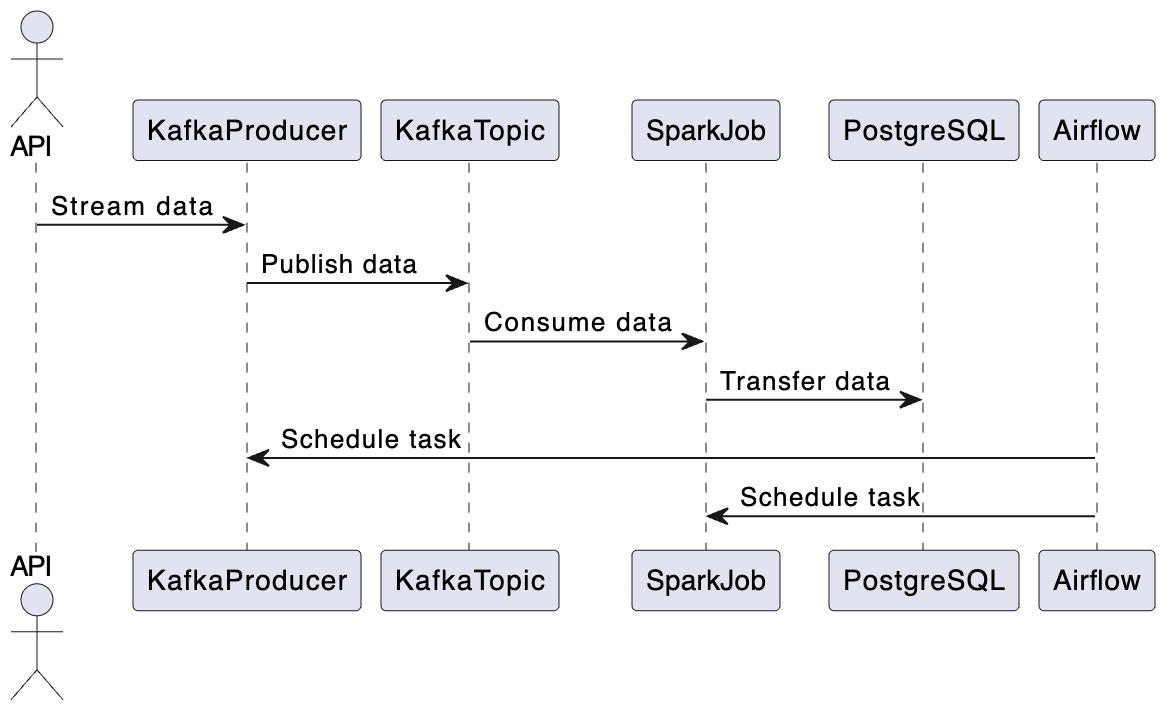
Having set-up our Postgres database, let’s delve into the details of the spark job. The goal is to stream the data from the Kafka topic rappel_conso to the Postgres table rappel_conso_table.
from pyspark.sql import SparkSession
from pyspark.sql.types import (
StructType,
StructField,
StringType,
)
from pyspark.sql.functions import from_json, col
from src.constants import POSTGRES_URL, POSTGRES_PROPERTIES, DB_FIELDS
import logginglogging.basicConfig(
level=logging.INFO, format="%(asctime)s:%(funcName)s:%(levelname)s:%(message)s"
)
def create_spark_session() -> SparkSession:
spark = (
SparkSession.builder.appName("PostgreSQL Connection with PySpark")
.config(
"spark.jars.packages",
"org.postgresql:postgresql:42.5.4,org.apache.spark:spark-sql-kafka-0-10_2.12:3.5.0",
)
.getOrCreate()
)
logging.info("Spark session created successfully")
return spark
def create_initial_dataframe(spark_session):
"""
Reads the streaming data and creates the initial dataframe accordingly.
"""
try:
# Gets the streaming data from topic random_names
df = (
spark_session.readStream.format("kafka")
.option("kafka.bootstrap.servers", "kafka:9092")
.option("subscribe", "rappel_conso")
.option("startingOffsets", "earliest")
.load()
)
logging.info("Initial dataframe created successfully")
except Exception as e:
logging.warning(f"Initial dataframe couldn't be created due to exception: e")
raise
return df
def create_final_dataframe(df):
"""
Modifies the initial dataframe, and creates the final dataframe.
"""
schema = StructType(
[StructField(field_name, StringType(), True) for field_name in DB_FIELDS]
)
df_out = (
df.selectExpr("CAST(value AS STRING)")
.select(from_json(col("value"), schema).alias("data"))
.select("data.*")
)
return df_out
def start_streaming(df_parsed, spark):
"""
Starts the streaming to table spark_streaming.rappel_conso in postgres
"""
# Read existing data from PostgreSQL
existing_data_df = spark.read.jdbc(
POSTGRES_URL, "rappel_conso", properties=POSTGRES_PROPERTIES
)
unique_column = "reference_fiche"
logging.info("Start streaming ...")
query = df_parsed.writeStream.foreachBatch(
lambda batch_df, _: (
batch_df.join(
existing_data_df, batch_df[unique_column] == existing_data_df[unique_column], "leftanti"
)
.write.jdbc(
POSTGRES_URL, "rappel_conso", "append", properties=POSTGRES_PROPERTIES
)
)
).trigger(once=True) \
.start()
return query.awaitTermination()
def write_to_postgres():
spark = create_spark_session()
df = create_initial_dataframe(spark)
df_final = create_final_dataframe(df)
start_streaming(df_final, spark=spark)
if __name__ == "__main__":
write_to_postgres()
Let’s break down the key highlights and functionalities of the spark job:
- First we create the Spark session
def create_spark_session() -> SparkSession:
spark = (
SparkSession.builder.appName("PostgreSQL Connection with PySpark")
.config(
"spark.jars.packages",
"org.postgresql:postgresql:42.5.4,org.apache.spark:spark-sql-kafka-0-10_2.12:3.5.0",)
.getOrCreate()
)
logging.info("Spark session created successfully")
return spark
2. The create_initial_dataframe function ingests streaming data from the Kafka topic using Spark’s structured streaming.
def create_initial_dataframe(spark_session):
"""
Reads the streaming data and creates the initial dataframe accordingly.
"""
try:
# Gets the streaming data from topic random_names
df = (
spark_session.readStream.format("kafka")
.option("kafka.bootstrap.servers", "kafka:9092")
.option("subscribe", "rappel_conso")
.option("startingOffsets", "earliest")
.load()
)
logging.info("Initial dataframe created successfully")
except Exception as e:
logging.warning(f"Initial dataframe couldn't be created due to exception: e")
raisereturn df
3. Once the data is ingested, create_final_dataframe transforms it. It applies a schema (defined by the columns DB_FIELDS) to the incoming JSON data, ensuring that the data is structured and ready for further processing.
def create_final_dataframe(df):
"""
Modifies the initial dataframe, and creates the final dataframe.
"""
schema = StructType(
[StructField(field_name, StringType(), True) for field_name in DB_FIELDS]
)
df_out = (
df.selectExpr("CAST(value AS STRING)")
.select(from_json(col("value"), schema).alias("data"))
.select("data.*")
)
return df_out
4. The start_streaming function reads existing data from the database, compares it with the incoming stream, and appends new records.
def start_streaming(df_parsed, spark):
"""
Starts the streaming to table spark_streaming.rappel_conso in postgres
"""
# Read existing data from PostgreSQL
existing_data_df = spark.read.jdbc(
POSTGRES_URL, "rappel_conso", properties=POSTGRES_PROPERTIES
)unique_column = "reference_fiche"
logging.info("Start streaming ...")
query = df_parsed.writeStream.foreachBatch(
lambda batch_df, _: (
batch_df.join(
existing_data_df, batch_df[unique_column] == existing_data_df[unique_column], "leftanti"
)
.write.jdbc(
POSTGRES_URL, "rappel_conso", "append", properties=POSTGRES_PROPERTIES
)
)
).trigger(once=True) \
.start()
return query.awaitTermination()
The complete code for the Spark job is in the file src/spark_pgsql/spark_streaming.py. We will use the Airflow DockerOperator to run this job, as explained in the upcoming section.
Let’s go through the process of creating the Docker image we need to run our Spark job. Here’s the Dockerfile for reference:
FROM bitnami/spark:latestWORKDIR /opt/bitnami/spark
RUN pip install py4j
COPY ./src/spark_pgsql/spark_streaming.py ./spark_streaming.py
COPY ./src/constants.py ./src/constants.py
ENV POSTGRES_DOCKER_USER=host.docker.internal
ARG POSTGRES_PASSWORD
ENV POSTGRES_PASSWORD=$POSTGRES_PASSWORD
In this Dockerfile, we start with the bitnami/spark image as our base. It’s a ready-to-use Spark image. We then install py4j, a tool needed for Spark to work with Python.
The environment variables POSTGRES_DOCKER_USER and POSTGRES_PASSWORD are set up for connecting to a PostgreSQL database. Since our database is on the host machine, we use host.docker.internal as the user. This allows our Docker container to access services on the host, in this case, the PostgreSQL database. The password for PostgreSQL is passed as a build argument, so it’s not hard-coded into the image.
It’s important to note that this approach, especially passing the database password at build time, might not be secure for production environments. It could potentially expose sensitive information. In such cases, more secure methods like Docker BuildKit should be considered.
Now, let’s build the Docker image for Spark:
docker build -f spark/Dockerfile -t rappel-conso/spark:latest --build-arg POSTGRES_PASSWORD=$POSTGRES_PASSWORD .
This command will build the image rappel-conso/spark:latest . This image includes everything needed to run our Spark job and will be used by Airflow’s DockerOperator to execute the job. Remember to replace $POSTGRES_PASSWORD with your actual PostgreSQL password when running this command.