


There’s a particular kind of tedium that every AI engineer knows intimately: the prompt-tuning loop. You write a system prompt, run your agent against a benchmark, read the failure traces, tweak the prompt, add a tool, rerun. Repeat this a few dozen times and you might move the needle. It’s grunt work dressed up in Python files. Now, a new open-source library called AutoAgent, built by Kevin Gu at thirdlayer.inc, proposes an unsettling alternative — don’t do that work yourself. Let an AI do it.
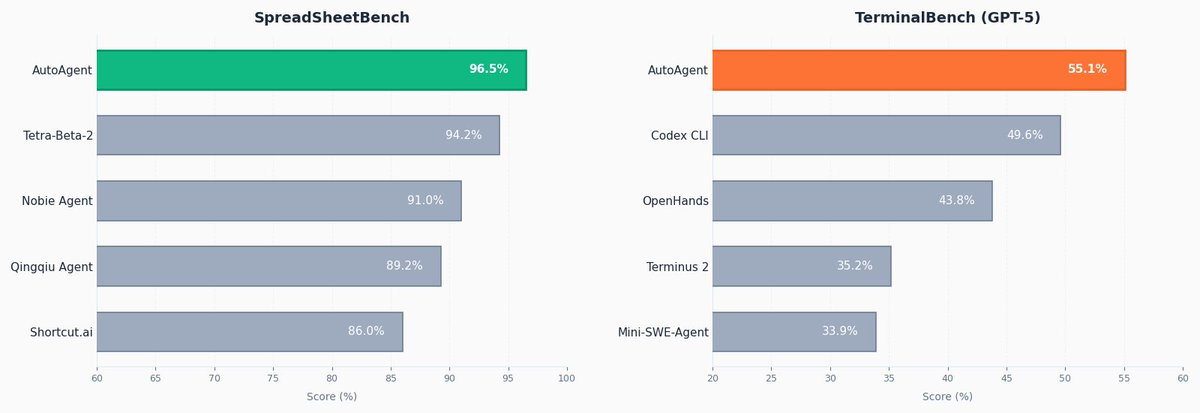
AutoAgent is an open source library for autonomously improving an agent on any domain. In a 24-hour run, it hit #1 on SpreadsheetBench with a score of 96.5%, and achieved the #1 GPT-5 score on TerminalBench with 55.1%.
What Is AutoAgent, Really?
AutoAgent is described as being ‘like autoresearch but for agent engineering.’ The idea: give an AI agent a task, let it build and iterate on an agent harness autonomously overnight. It modifies the system prompt, tools, agent configuration, and orchestration, runs the benchmark, checks the score, keeps or discards the change, and repeats.
To understand the analogy: Andrej Karpathy’s autoresearch does the same thing for ML training — it loops through propose-train-evaluate cycles, keeping only changes that improve validation loss. AutoAgent ports that same ratchet loop from ML training into agent engineering. Instead of optimizing a model’s weights or training hyperparameters, it optimizes the harness — the system prompt, tool definitions, routing logic, and orchestration strategy that determine how an agent behaves on a task.
A harness, in this context, is the scaffolding around an LLM: what system prompt it receives, what tools it can call, how it routes between sub-agents, and how tasks are formatted as inputs. Most agent engineers hand-craft this scaffolding. AutoAgent automates the iteration on that scaffolding itself.
The Architecture: Two Agents, One File, One Directive
The GitHub repo has a deliberately simple structure. agent.py is the entire harness under test in a single file — it contains config, tool definitions, agent registry, routing/orchestration, and the Harbor adapter boundary. The adapter section is explicitly marked as fixed; the rest is the primary edit surface for the meta-agent. program.md contains instructions for the meta-agent plus the directive (what kind of agent to build), and this is the only file the human edits.
Think of it as a separation of concerns between human and machine. The human sets the direction inside program.md. The meta-agent (a separate, higher-level AI) then reads that directive, inspects agent.py, runs the benchmark, diagnoses what failed, rewrites the relevant parts of agent.py, and repeats. The human never touches agent.py directly.
A critical piece of infrastructure that keeps the loop coherent across iterations is results.tsv — an experiment log automatically created and maintained by the meta-agent. It tracks every experiment run, giving the meta-agent a history to learn from and calibrate what to try next. The full project structure also includes Dockerfile.base, an optional .agent/ directory for reusable agent workspace artifacts like prompts and skills, a tasks/ folder for benchmark payloads (added per benchmark branch), and a jobs/ directory for Harbor job outputs.
The metric is total score produced by the benchmark’s task test suites. The meta-agent hill-climbs on this score. Every experiment produces a numeric score: keep if better, discard if not — the same loop as autoresearch.
The Task Format and Harbor Integration
Benchmarks are expressed as tasks in Harbor format. Each task lives under tasks/my-task/ and includes a task.toml for config like timeouts and metadata, an instruction.md which is the prompt sent to the agent, a tests/ directory with a test.sh entry point that writes a score to /logs/reward.txt, and a test.py for verification using either deterministic checks or LLM-as-judge. An environment/Dockerfile defines the task container, and a files/ directory holds reference files mounted into the container. Tests write a score between 0.0 and 1.0 to the verifier logs. The meta-agent hill-climbs on this.
The LLM-as-judge pattern here is worth flagging: instead of only checking answers deterministically (like unit tests), the test suite can use another LLM to evaluate whether the agent’s output is ‘correct enough.’ This is common in agentic benchmarks where correct answers aren’t reducible to string matching.
Key Takeaways
- Autonomous harness engineering works — AutoAgent proves that a meta-agent can replace the human prompt-tuning loop entirely, iterating on
agent.pyovernight without any human touching the harness files directly. - Benchmark results validate the approach — In a 24-hour run, AutoAgent hit #1 on SpreadsheetBench (96.5%) and the top GPT-5 score on TerminalBench (55.1%), beating every other entry that was hand-engineered by humans.
- ‘Model empathy’ may be a real phenomenon — A Claude meta-agent optimizing a Claude task agent appeared to diagnose failures more accurately than when optimizing a GPT-based agent, suggesting same-family model pairing could matter when designing your AutoAgent loop.
- The human’s job shifts from engineer to director — You don’t write or edit
agent.py. You writeprogram.md— a plain Markdown directive that steers the meta-agent. The distinction mirrors the broader shift in agentic engineering from writing code to setting goals. - It’s plug-and-play with any benchmark — Because tasks follow Harbor’s open format and agents run in Docker containers, AutoAgent is domain-agnostic. Any scorable task — spreadsheets, terminal commands, or your own custom domain — can become a target for autonomous self-optimization.
Check out the Repo and Tweet. Also, feel free to follow us on Twitter and don’t forget to join our 120k+ ML SubReddit and Subscribe to our Newsletter. Wait! are you on telegram? now you can join us on telegram as well.
Need to partner with us for promoting your GitHub Repo OR Hugging Face Page OR Product Release OR Webinar etc.? Connect with us